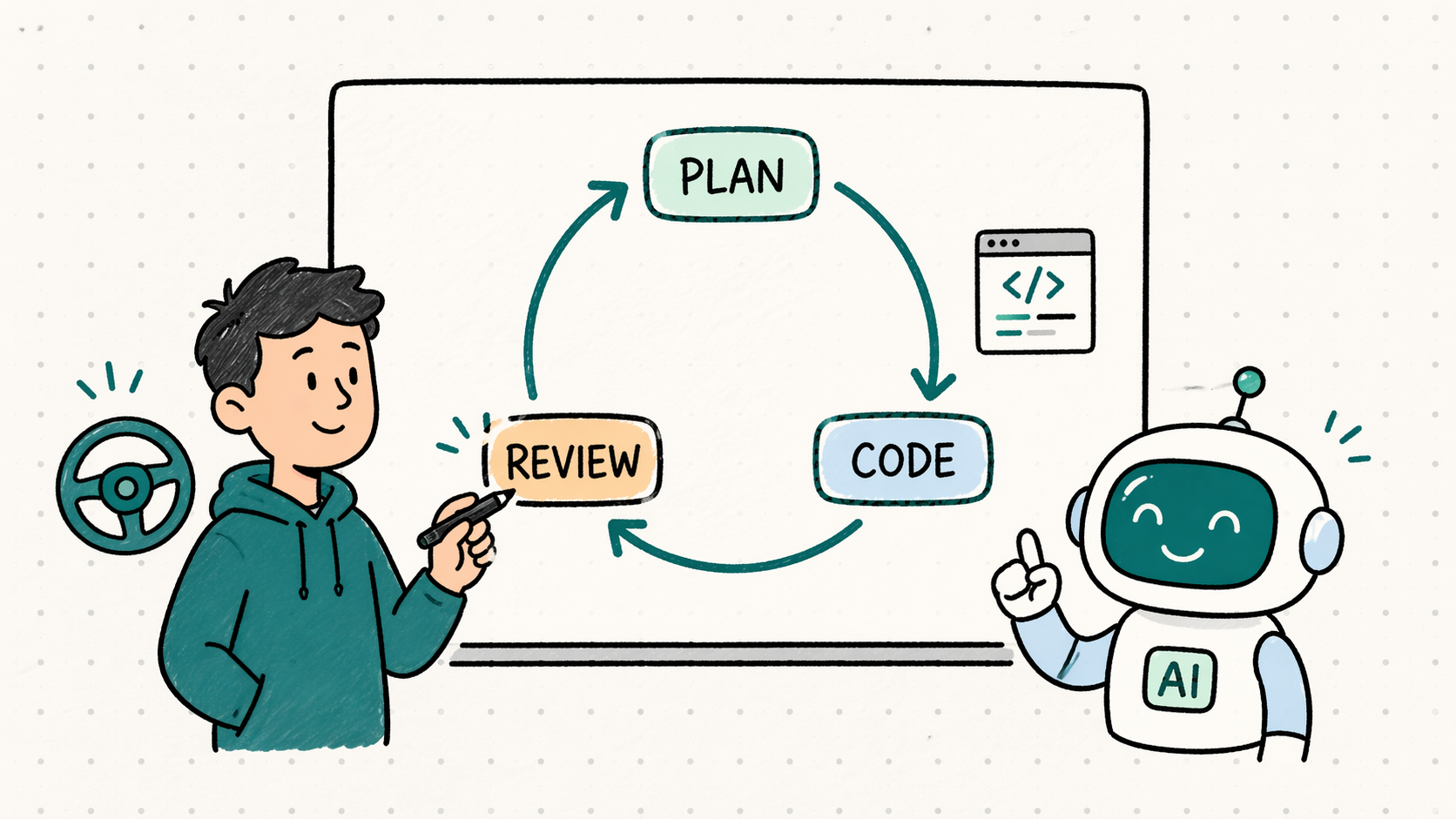
I have been integrating AI agents into my workflow as a developer. The most useful mental model so far is simple: I treat the AI agent like another developer on the team.
Yes, developer.
It is fast, generalist, and familiar with many languages, frameworks, and patterns. It can type code quickly, explore APIs, and explain unfamiliar ideas without needing a long introduction.
It also needs direction, review, and clear boundaries.
AI agents are useful, but without a workflow they can make you lose ownership of the codebase. My answer became a simple loop: Plan, Code, Review.
That distinction matters because current AI has not reached AGI yet.
AGI, or Artificial General Intelligence, is a hypothetical type of AI that “matches or surpasses human capabilities across virtually all cognitive tasks.”
That is not what we have today. We have useful agents that work best inside clear, constrained feedback loops.
Current AI is still below that bar, but it is already useful in software development.
Programming is a good environment for current AI agents because programming languages have clear syntax and strong feedback loops. Compilers complain. Tests fail. Linters point at mistakes. Runtime errors show where reality disagrees with the generated code. In many cases, failure is visible.
That makes code generation a strong use case for the AI agent.
I cannot beat the AI agent in typing, it is far faster than me. The same applies to exploring APIs, generating boilerplate, and moving across topics quickly.
But I am much better than the AI agent at other parts of the work.
I can switch contexts with memory. I can connect today’s decision to something that happened six months ago. I can make better calls in the languages and frameworks I have mastered. I can listen to valid trade-offs from the AI agent, then decide which one fits the codebase, the team, and the moment.
The AI agent has speed and breadth. I have context, ownership, and judgment.
That is the balance I want.
The question is: How do I work with an AI agent without losing ownership of the codebase?
For me, the answer is PCR: Plan, Code, Review.
The Risk Is Losing the Loop
The biggest risk I found was volume. Humans already produce enough bad code.
An AI agent can produce too much code too quickly, and that creates too much review too quickly. After a while, the developer can become tired, passive, and disconnected from the work.
That is what I wanted to avoid. I did not want to approve changes because they looked fine, or scroll through generated code while slowly losing the thread. I wanted the codebase to remain something I understand and own.
This is what I call losing the loop.
You lose the loop when you cannot explain why the change exists, describe the trade-off, or tell whether the solution belongs in the system. Speed helps only when understanding keeps up with it. Otherwise, speed becomes noise.
This is close to the same risk I wrote about in The pipeline ate my code. Automation can help you, but it cannot carry your engineering judgment for you.
So I needed a loop, not just a better prompt.
The model I wanted was close to pairing with another senior developer. A good engineer gives me another perspective, surprises me with different solutions, and creates pressure to explain my thinking out loud. That pressure is useful because explaining a decision often improves it.
I wanted that from the AI agent, but I also needed boundaries.
A human teammate usually understands when we are brainstorming, designing, coding, or reviewing. With an AI agent, I had to make those modes explicit.
Plan, Code, Review
This is where Codex became part of my daily workflow.
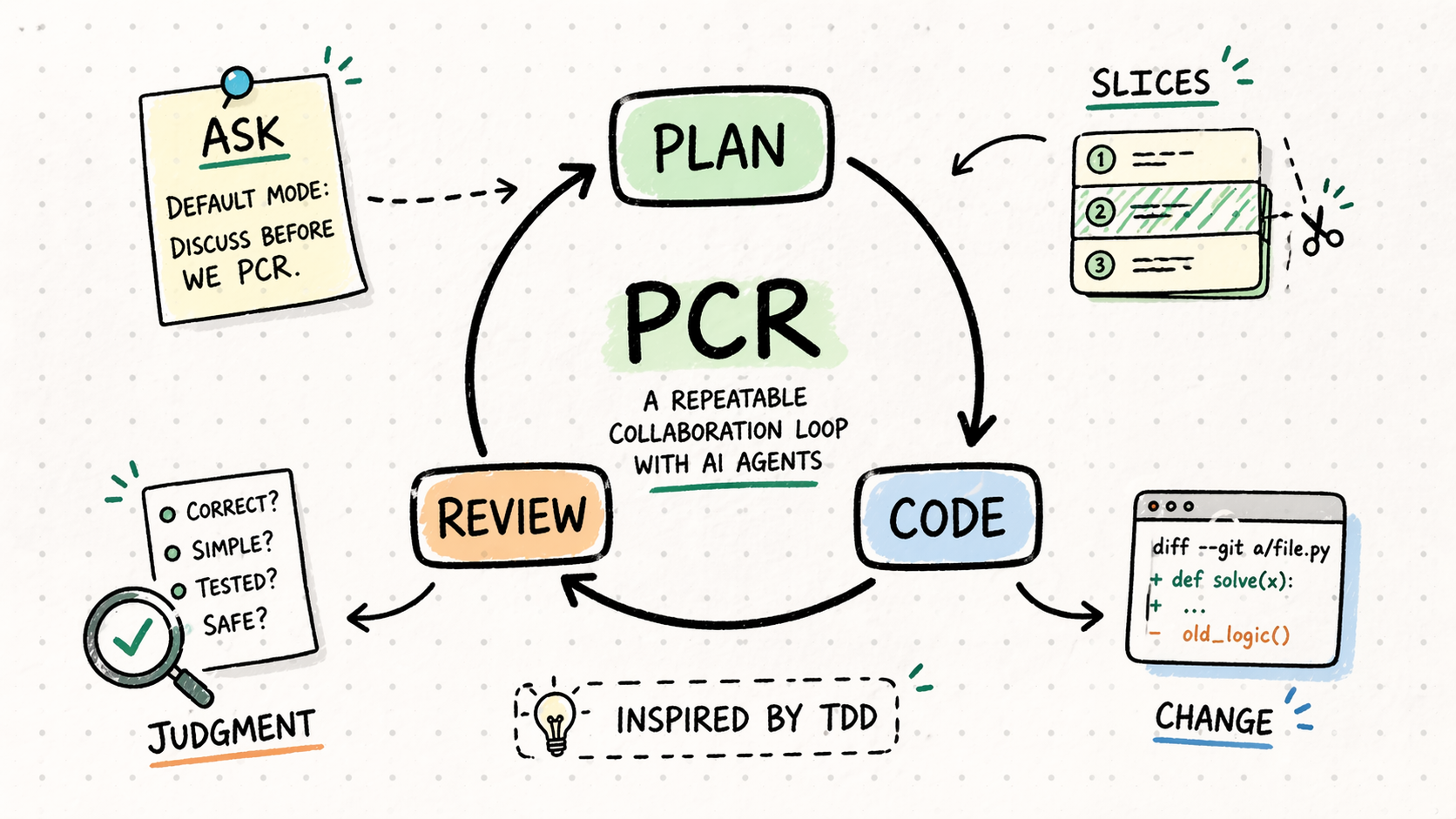
I created four working modes: ask, plan, code, and review. The modes are useful, but the real idea behind them
is the loop they create.
These modes could be mapped to skills. The important part is not the mechanism. The important part is that the agent knows which kind of collaboration we are having.
Plan, Code, Review. (PCR)
TDD gave me a loop for writing code: Red, Green, Refactor.
PCR gives me a loop for working with AI agents.
ask sits before the loop. It is the default discussion mode, like talking with a senior developer in the office. I use
it to test ideas, compare options, and clarify the problem before I ask for a plan.
The goal is simple: a short planning step, a small implementation slice, then a review step where I stay close to the change.
| Step | Purpose | Deliverable |
|---|---|---|
plan |
Choose a direction, split the work into slices, and create a checkpoint before code starts. | Implementation slices and risks. |
code |
Let the agent write the chosen slice after the problem, direction, and boundary are clear. | A small, reviewable code change. |
review |
Review the changes myself, then use Codex to challenge my thinking and surface risks I may have missed. | Accepted changes or a new PCR loop. |
The agent is not the owner of the review. I am.
Then I repeat:
- Plan the next slice.
- Let the agent code it.
- Review the result and challenge the decisions.
PCR is not a replacement for testing. Tests are still part of the work, especially in the code step. PCR is the collaboration loop around the agent. It keeps the work small, keeps the decisions visible, and keeps me responsible for the result.
For example, instead of asking the agent to “refactor this service,” I first ask for a plan. The output I want is not code. I want slices, risks, and tests. Only after that do I move to code.
The agent can help me think, plan, and write code faster. But the workflow must keep me close enough to understand the change, review the trade-offs, and own the final shape of the code.
What Changed in My Work
The biggest change is that Codex forced me to make hidden decisions explicit.
Before using Codex this way, I would often think, design, type, test, refactor, and review in one long flow. That can work, especially when I know the area well. It also hides decisions inside motion. A design choice can happen while writing a function. A trade-off can happen while fixing a test. A shortcut can happen because I am tired and the code is already open.
Because the agent can move quickly, I had to become clearer about when I am thinking and when I am executing. I had to name the mode, explain the goal, and decide whether I wanted discussion, planning, implementation, or review.
Sometimes it gives me a solution I did not expect. Sometimes that solution is better than mine, and sometimes it is technically correct but wrong for the project. Both cases are useful.
The first one teaches me. The second one forces me to explain the system better.
That is one of the hidden benefits of working with an AI agent. If I cannot explain the constraint clearly, the agent will often step over it. That is annoying, but it is also feedback. It shows me where my own understanding, documentation, or architecture is not explicit enough.
So the workflow is about controlling the agent by improving the way I communicate engineering intent.
A good AI workflow makes hidden knowledge more visible. It pushes hidden assumptions into words. It turns “you know what I mean” into actual constraints. It makes me say why a boundary matters, why a test should exist, why a shortcut is acceptable, or why a generic abstraction would hurt us.
That is valuable because the collaboration makes my own judgment more explicit.
The Takeaway
AI agents are useful because they are fast and broad. Ownership still stays with the developer: the context, the trade-offs, and the final decision.
For me, the working model is simple: treat the AI agent as a fast generalist teammate, then manage the collaboration with a clear loop.
Plan. Code. Review.
That is PCR.
It is inspired by TDD, but for augmented programming. It is the loop I use to keep AI-assisted work small, understandable, and owned.
Use the agent’s speed, but keep your hands on the steering wheel.
The agent can move fast. PCR keeps the work owned.